


Download YearPlanner – free Windows calendar tool for appointments
Overview – Why YearPlanner Still Matters in 2025
YearPlanner is a compact, Windows‑based calendar creator that has been helping users keep track of appointments since its first release in 2005. Although the latest public build (v2.5.8) dates back to June 14 2007, the program’s lightweight design and straightforward interface keep it relevant for users who prefer a classic, non‑cloud solution. The trial version is free to download, runs on Windows 98 and earlier, and is available exclusively in English.
With more than 14 500 downloads to date and a steady trickle of new users each week, YearPlanner remains especially popular in regions such as India, Romania, and the Philippines where low‑resource PCs are still common. Its core promise—“Never forget another appointment”—is delivered through a simple month‑grid, color‑coded event markers, and built‑in import tools for Outlook. The program also offers context‑sensitive help and a handful of zoom levels, making it easy to see a whole year at a glance or focus on a single day.
Because it occupies far less disk space than many modern productivity suites, YearPlanner is an ideal choice for users who need a reliable calendar without the overhead of large installations or constant internet connectivity. Whether you are a freelance professional juggling client meetings, a student organizing class schedules, or a small business owner tracking deadlines, YearPlanner gives you a clear visual reference that can be printed or exported as needed.
Key Features That Keep YearPlanner Competitive
- Lightweight Architecture: The installer is under 2 MB, making it perfect for older hardware and limited storage devices.
- Month‑Grid View with Zoom Levels: Choose from several built‑in zoom levels to see a whole year, a quarter, or a single month in detail.
- Outlook Import (Recurring Events Fixed): Seamlessly import recurring appointments from Microsoft Outlook, thanks to a recent fix that resolves previous duplication issues.
- Context‑Sensitive Help: On‑the‑fly assistance appears when you hover over toolbar icons, reducing the learning curve for new users.
- Print‑Ready Layouts: Generate printable calendars in portrait or landscape mode, ideal for wall‑mount displays.
- Customizable Color Tags: Assign colors to different event categories (e.g., meetings, birthdays, deadlines) for instant visual differentiation.
- Simple Export Options: Export your calendar to CSV or iCal format for use with other applications.
- Multi‑Language Keyboard Support: Although the UI is English‑only, the program accepts input in any language supported by the Windows keyboard layout.
While YearPlanner does not boast AI‑driven reminders or cloud sync, its straightforward feature set appeals to users who value stability and speed over flashy add‑ons. The program’s design follows a classic Windows‑style menu system, which means there is virtually no learning curve for anyone who has used Windows since the late 1990s. Moreover, the recent updates—particularly the fix for Outlook recurring events and the addition of more zoom levels—demonstrate that the developer still maintains a baseline level of support, ensuring the software works with modern file formats while preserving its original lightweight ethos.
Installation, First‑Run Guide, and System Compatibility
Installing YearPlanner is intentionally simple. After downloading the YearPlanner‑setup.exe file, double‑click the installer and follow the on‑screen prompts. The wizard asks only for an installation folder (the default C:\Program Files\YearPlanner works well) and whether you want a desktop shortcut. Because the program is built for Windows 98 and earlier, it runs flawlessly on legacy systems, but it also functions on Windows XP, Vista, 7, and even Windows 10 when run in compatibility mode. The Windows 98 and prior versions requirement means the software does not rely on .NET Framework or modern APIs, which contributes to its tiny footprint.
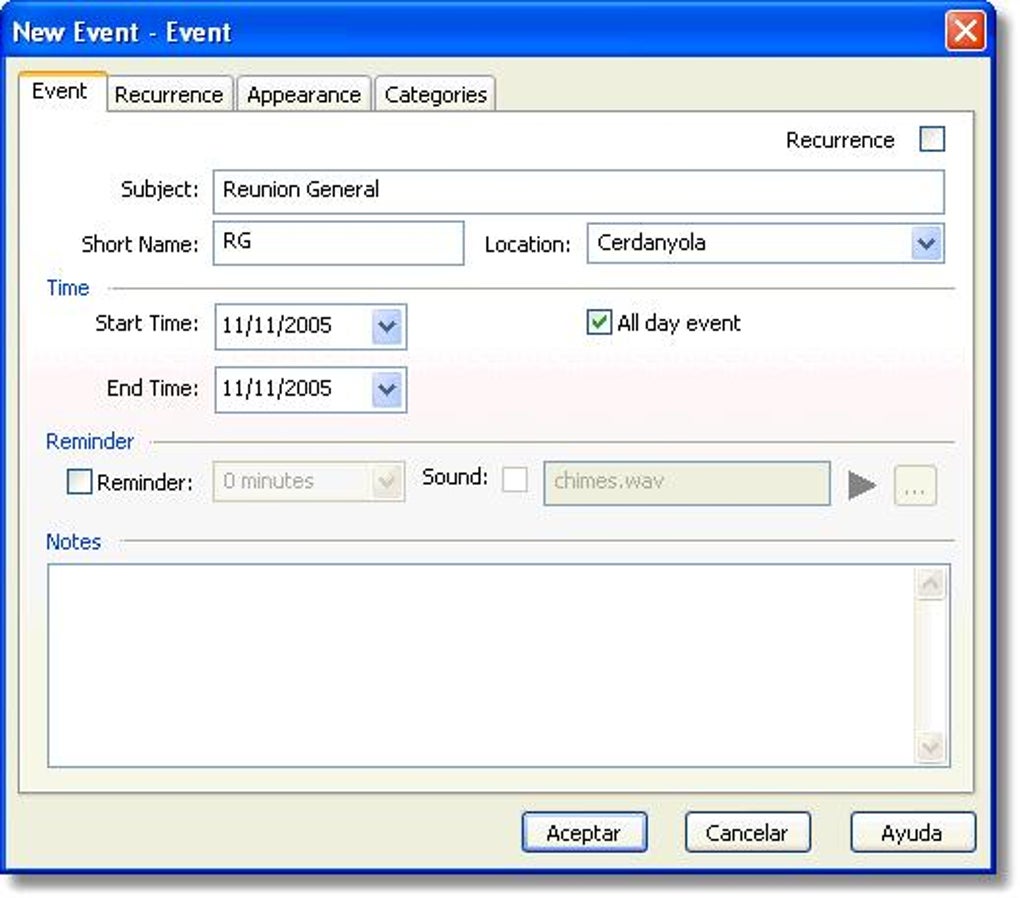
Upon launching YearPlanner for the first time, you are greeted with a blank yearly grid. The toolbar at the top provides quick access to “New Event,” “Import Outlook,” “Zoom,” and “Print.” To add an appointment, click on the desired date cell, type the event name, choose a color tag, and hit Enter. For recurring meetings, select the “Recurring” checkbox in the event dialog; the recent patch now correctly replicates weekly or monthly patterns without creating duplicate entries. If you already use Outlook, the “Import Outlook” button reads your .pst file and maps recurring events into the YearPlanner grid, preserving start dates and intervals.
After creating a few entries, you may want to explore the zoom feature. The zoom levels range from “Year Overview” (showing all 12 months at a glance) to “Day Detail” (focusing on a single day with hourly slots). Adjusting the zoom is instant, thanks to the program’s minimal graphics processing needs. Finally, to back up your calendar, go to File → Export and choose CSV or iCal. This export can be imported into Google Calendar, Apple Calendar, or any other modern calendar app, giving you flexibility while keeping YearPlanner as your primary offline reference.
Pros, Cons, Frequently Asked Questions, and Final Thoughts
Pros
- Extremely small installation size – under 2 MB.
- Runs on very old Windows versions without additional runtimes.
- Simple, clutter‑free interface ideal for quick appointment entry.
- Reliable Outlook import, including support for recurring events.
- Multiple zoom levels and printable layouts for flexible viewing.
Cons
- No cloud synchronization or mobile app counterpart.
- Interface looks dated compared with modern calendar apps.
- Lacks advanced reminder notifications or integration with email services.
- Only English language UI, though input supports any keyboard layout.
- Development appears sporadic; major updates have not been released since 2007.
Frequently Asked Questions
Is YearPlanner still safe to download?
Yes. The installer is hosted on a reputable software catalog and has not been reported to contain malware. As with any legacy program, run a quick antivirus scan after download.
Can I sync YearPlanner with my Google Calendar?
Direct sync is not built‑in, but you can export your calendar as iCal or CSV and then import that file into Google Calendar.
What Windows versions are officially supported?
YearPlanner was designed for Windows 98 and earlier, but it runs without issues on Windows XP, Vista, 7, and even Windows 10 when launched in compatibility mode.
Is there a way to receive reminders for events?
The free trial does not include pop‑up reminders. Users typically rely on printed calendars or external alarm tools for alerts.
How do I upgrade from the trial to the full version?
A purchase link is provided on the download page. After buying, you receive a registration key that unlocks the full feature set and removes the trial limitation.
Conclusion – Is YearPlanner Right for You?
YearPlanner excels in scenarios where a lightweight, offline calendar is needed on older hardware. Its straightforward design, reliable Outlook import, and printable outputs make it a solid choice for users who do not require cloud sync or advanced notification features. If you are comfortable working with a classic Windows interface and value speed over modern aesthetics, downloading the free trial today will give you a clear sense of its suitability. For power users who demand mobile access, AI reminders, or collaborative sharing, a contemporary cloud‑based calendar may be more appropriate. Nonetheless, YearPlanner remains a dependable, secure option that lives up to its promise: never forget another appointment.







